
🚀 KeepActive TT 2.0 is here! 3× the power, 5× the ease. →

Time & Attendance

Time and Attendance Tracking

Know who started late, who left early and how many hours everyone really worked — without clock-ins or manual timesheets.

Attendance is recorded automatically from computer activity and checked against each employee's schedule. Timesheets, absences and offline work in one place.

No credit card required · Windows, macOS, Linux

  • 5,000+ organizations
  • 60+ countries
  • 6 interface languages
KeepActive · Time & Attendance
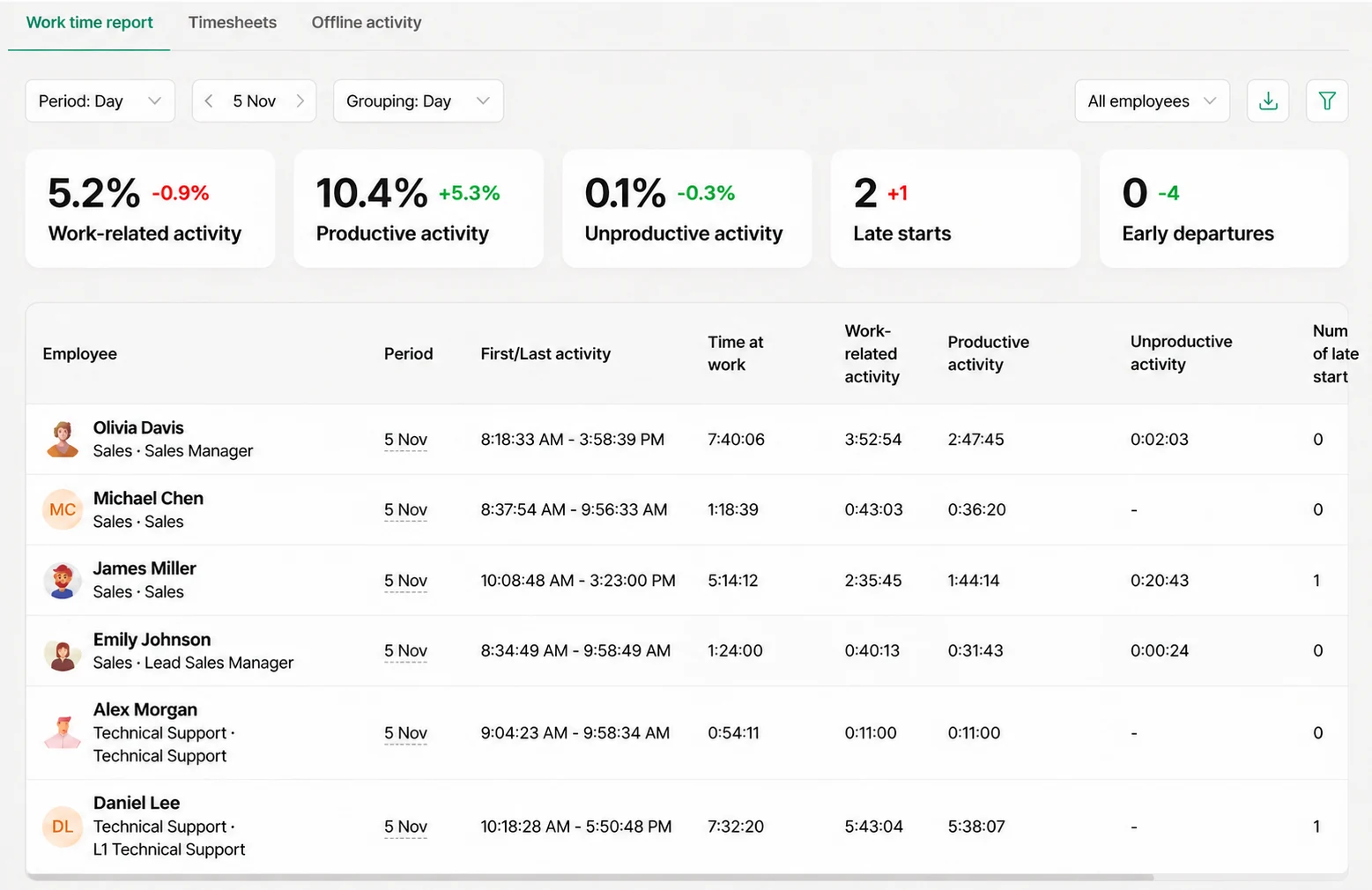
KeepActive time and attendance tracking software: work time report with summary metrics, first and last activity, time at work and activity per employee.
Summary metrics: work-related, productive and unproductive activity, late starts and early departures with change versus the previous period.
Summary metrics vs previous period
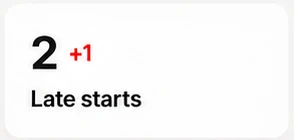
Late starts: 2, one more than the previous period.
Late starts tracked

What it is

What is time and attendance tracking software?

Time and attendance tracking software records when employees start and finish work, how long they work and whether they follow their schedule. In KeepActive, attendance is captured automatically from computer activity: the Work time report shows first and last activity, time at work, late starts and early departures, and Timesheets total the days and hours worked.

Classic time and attendance systems rely on clock-ins, badges or self-reported timesheets — easy to forget and easy to fake. KeepActive records the real workday as it happens and compares it with the schedule you set, so tracking employee time and attendance takes no effort from anyone.

Unlike a basic clock-in app, this time and attendance tracking system works as real time attendance software: the moment someone starts work, it shows up. Time tracking and attendance live in one report: not only whether someone was at work, but how much of that time was work-related. Absences, approved offline work and scheduled hours complete the picture for payroll and HR.

How it looks

How time and attendance tracking looks in KeepActive

Real screens from KeepActive — three tabs that cover the whole attendance cycle, from the first login to payroll.

KeepActive · Work time report
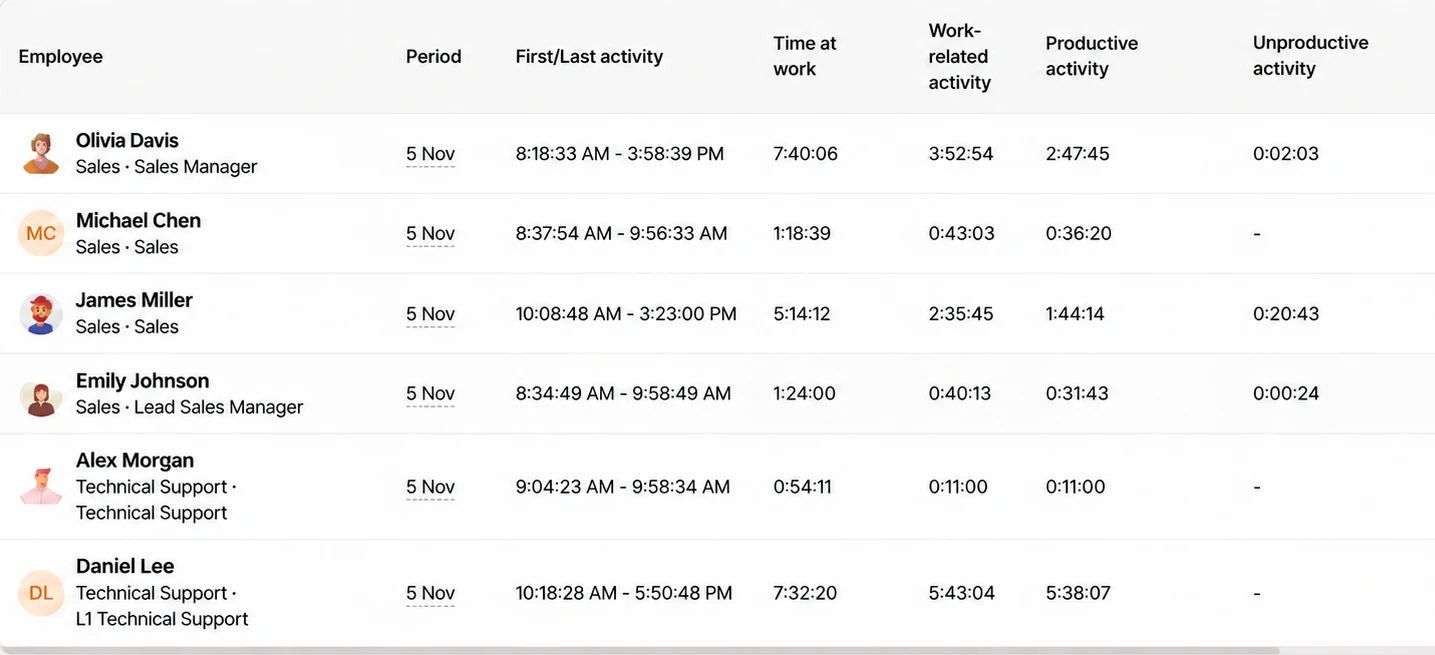
Work time report: summary metrics and a table with first/last activity, time at work and activity per employee.
James Miller: first activity 10:08:48 AM, 5:14:12 at work.
First activity 10:08 AM · counted as a late start

Work time report

See how every employee used their working time: when they started and finished, how long they were at work and how much of it was work-related, productive or unproductive.

  • First and last activity and time at work
  • Number of late starts and early departures
  • Summary metrics with change vs the previous period
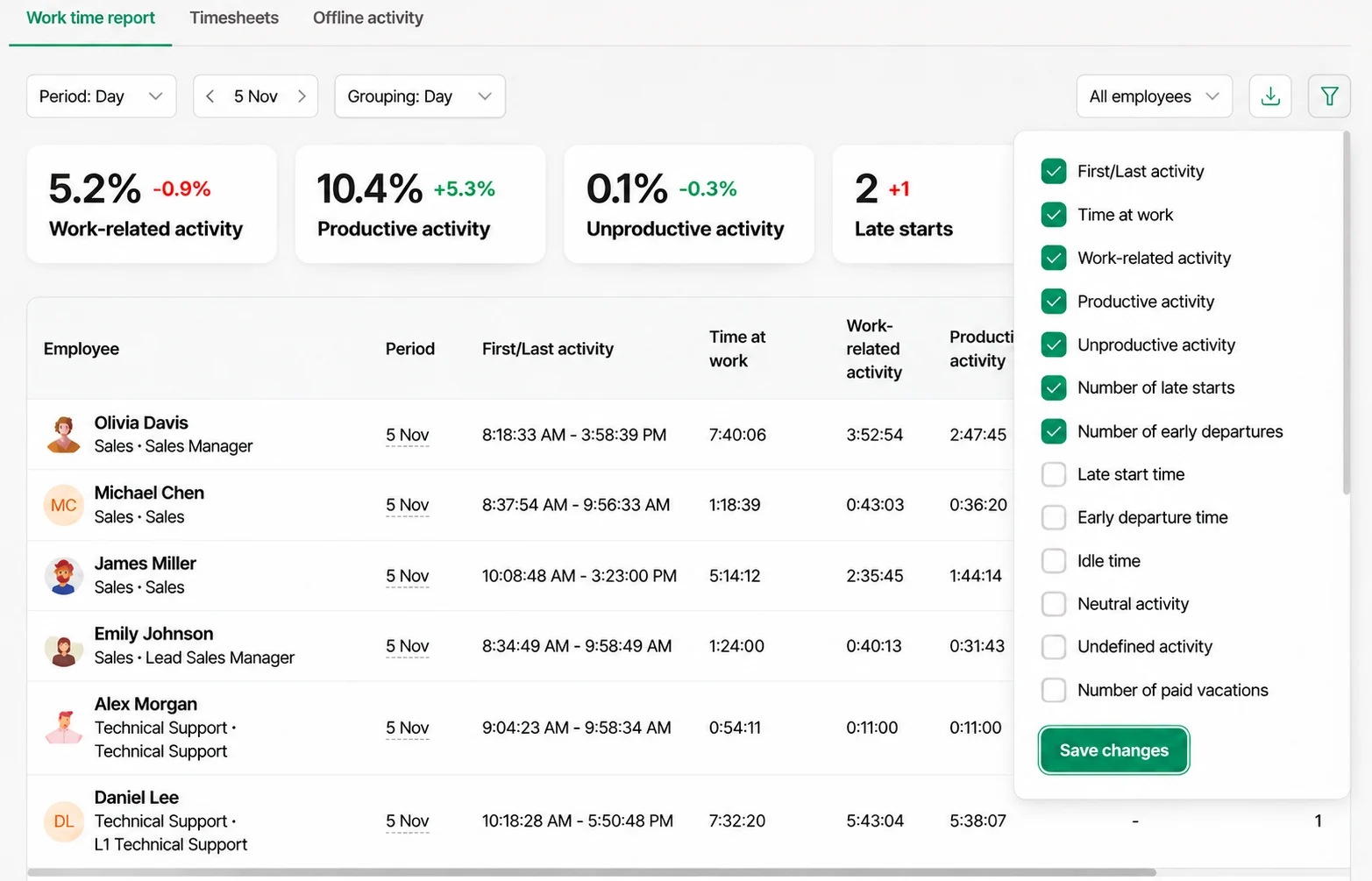
KeepActive · Work time report
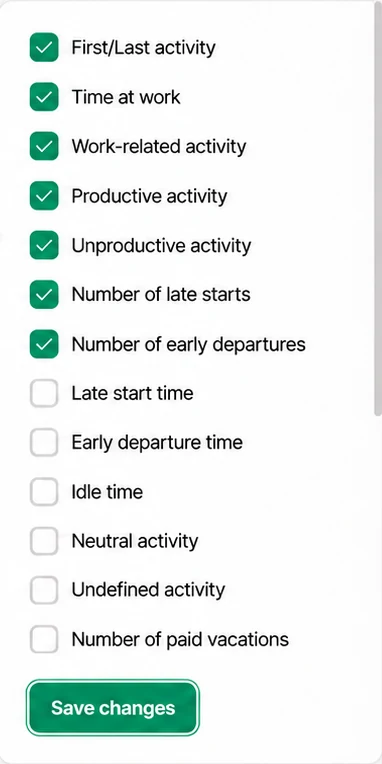
Column settings panel with first/last activity, time at work, late starts, idle time and paid vacations.
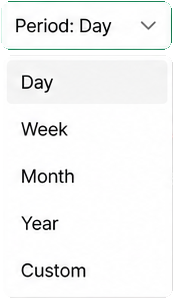
Period: Day, Week, Month, Year, Custom.

Your columns, your period

Show exactly what you need. Pick the period and grouping, filter by employee or department and choose the columns in the table.

  • Late start and early departure time, idle time, neutral activity
  • Number of paid vacations and other HR columns
  • Sort any column and export the report
KeepActive · Timesheets
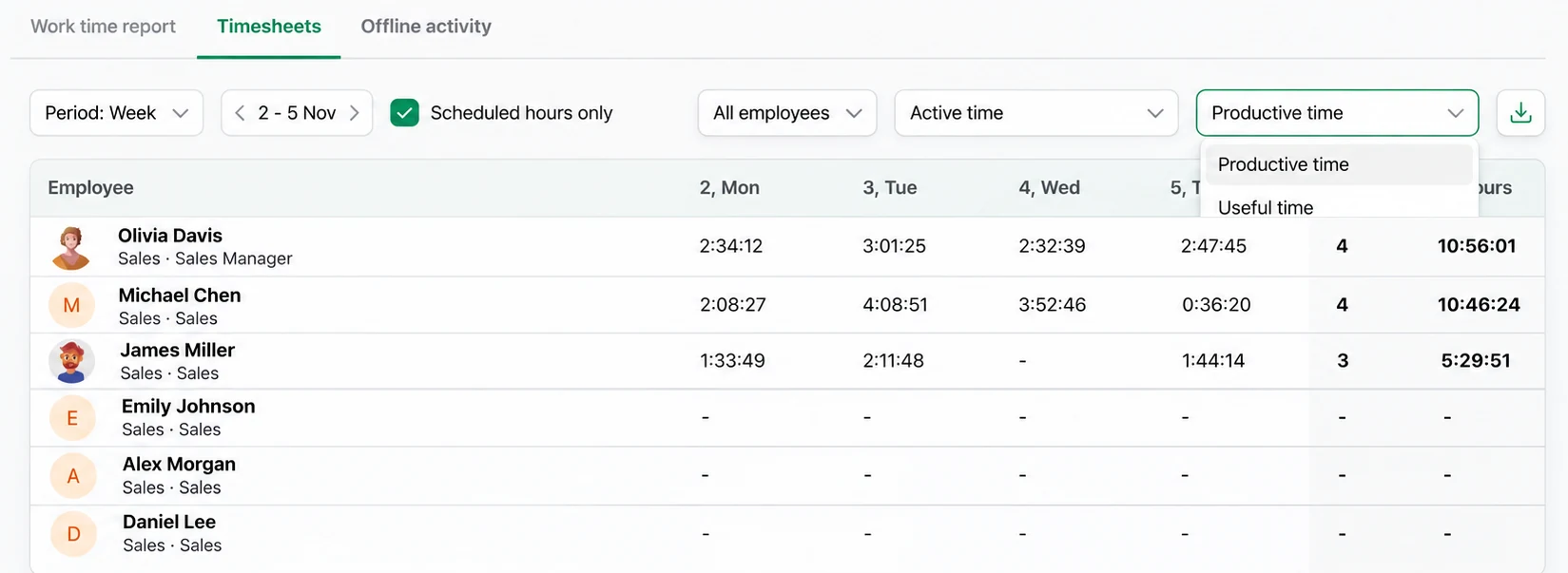
Timesheets for 2–5 Nov with productive time per day, days worked and total hours per employee.

Timesheets

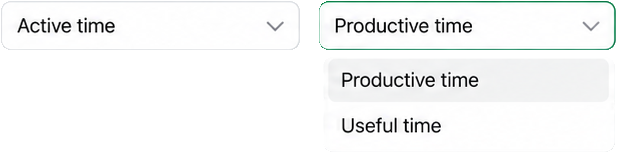
Days and hours worked per employee, day by day, ready for payroll. Choose how time is counted and keep only scheduled hours.

  • Actual time: from first to last activity · Active time: all activity incl. offline, no idle
  • Absence codes: DO, PL, UL, BT, SL, UA
  • Productive or useful time view, plus export
KeepActive · Offline activity
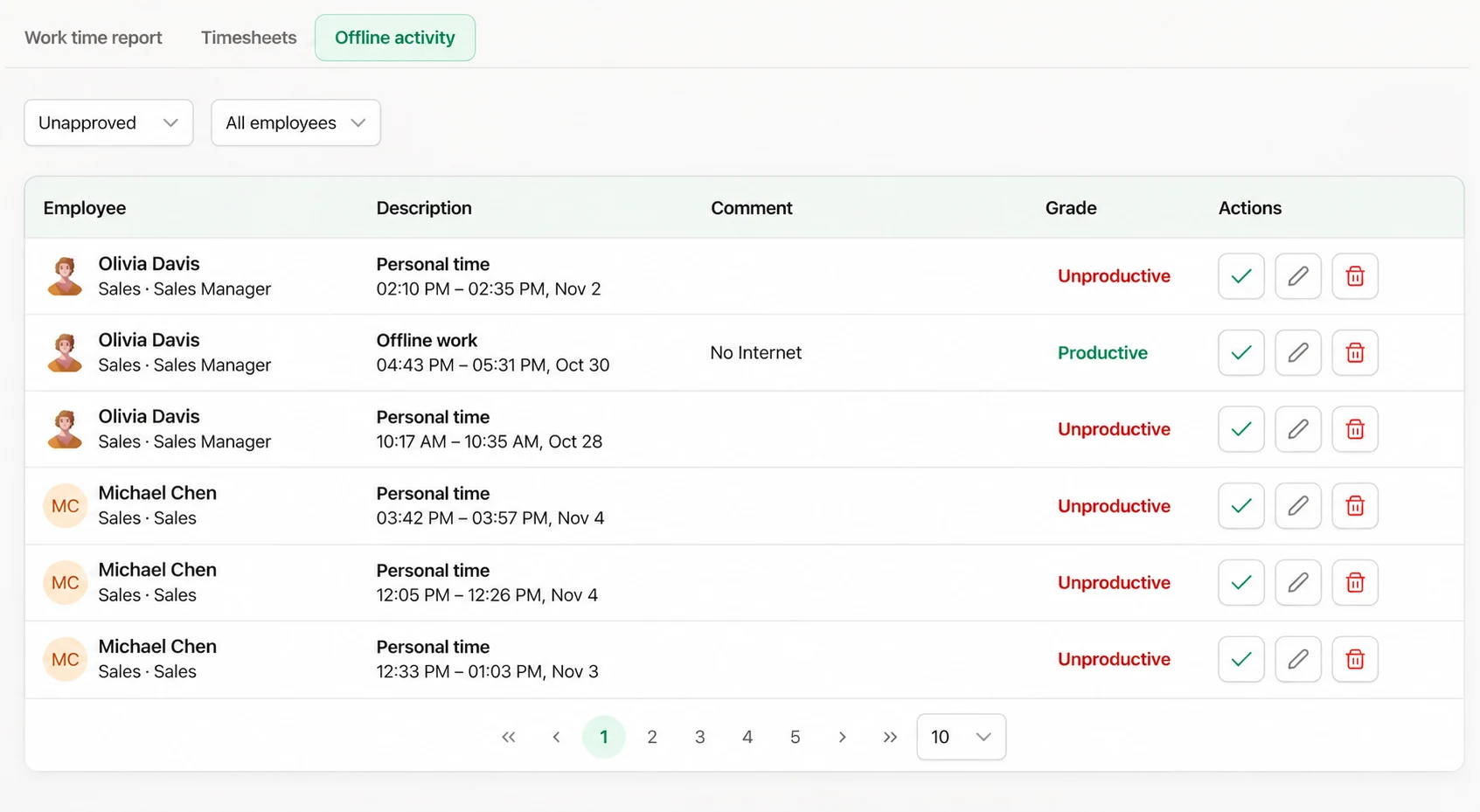
Offline activity: unapproved records of personal time and offline work with grade and approve, edit, delete actions.
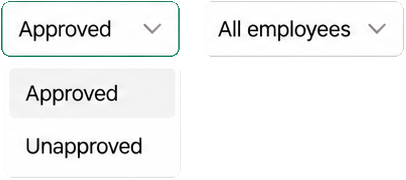
Filters: Approved or Unapproved, and All employees.

Offline activity

Meetings, calls and fieldwork count too. Employees log time away from the computer with a comment; managers approve, edit or delete it in one click.

  • Offline work graded productive, personal time unproductive
  • Filter approved and unapproved records
  • Auto-approved and locked after 14 days

Business value

What tasks time and attendance software solves

Manual timesheets cost hours every week and are still wrong. Automatic attendance gives HR, payroll and managers the same accurate numbers.

  1. End manual clock-ins

    Arrival and departure are recorded automatically from the first and last activity. Nothing to forget, nothing to fill in.

  2. Pay for the hours actually worked

    Timesheets total days and hours per employee, with approved offline work included — accurate payroll for hourly and salaried staff.

  3. Improve punctuality

    Late starts and early departures are counted against each schedule, with the change from last period right on top.

  4. Plan coverage and staffing

    See who works when, and spread breaks and shifts so there is always someone available.

  5. Track remote attendance fairly

    Remote, hybrid and office staff are measured by the same rules — no badges, no self-reported hours.

  6. Keep HR records audit-ready

    Absences, vacations and sick leave are coded in the timesheet, and every report can be exported.

Features

Time and attendance management software features

Everything HR and managers need to know about working time — in three reports.

What the work time report shows

  • First and last activity of the day
  • Time at work
  • Work-related, productive and unproductive activity
  • Number of late starts and early departures
  • Late start and early departure time, idle time
  • Paid vacations and other optional columns
Work time report table: employee, period, first/last activity, time at work, work-related and productive activity.

Schedules and rules you control

  • Work schedules for the company, a department or one employee
  • Allowed late start and early departure: 5–60 minutes
  • Schedule exceptions for holidays and short days
  • Time off: business trip, sick, paid or unpaid leave
  • Offline work approval, auto-locked after 14 days
  • Managers see only employees in their scope

Absences right in the timesheet

With Scheduled hours only turned on, each day off or leave appears in the timesheet as a clear code — no separate absence calendar to cross-check.

  • DO Day off
  • PL Paid leave
  • UL Unpaid leave
  • BT Business trip
  • SL Sick leave
  • UA Unexcused absence

Who it's for

Who uses time and attendance software solutions

For anyone who needs accurate working hours without chasing timesheets.

Use cases

Time and attendance tracking in practice: two client cases

What changed when managers could see who was actually working — and when.

Client case No. 18 Online store · Remote sales team

Order cancellations fell from 30% to 22% in one week

  1. Situation

    An online store moved its sales managers to remote work. Orders grew, but so did cancellations: around 30%. Customers who weren't called back simply went to competitors.

  2. How attendance data helped

    The owner tracked when managers were actually working and arranged lunch breaks so that someone was always available to call customers back.

Result: the cancellation rate dropped to 22% after just one week, even as the number of orders grew.

Read the full case →
Client case No. 21 Insurance · Remote departments

A large insurer kept discipline high after going remote

  1. Situation

    Claims, underwriting and the call center all moved to remote work. Senior management worried that discipline would slip without the office.

  2. How attendance data helped

    The company used reports only — no screen monitoring. Department heads compared each employee's metrics with targets for the position, and both staff and managers received monthly reports.

Result: employees' discipline and effectiveness increased, according to the client's own survey.

Read the full case →

Getting started

Start time and attendance tracking in three steps

Two components to install, about five minutes each. Attendance data stays on your own server and never leaves your infrastructure.

  1. Server.

    Install the Server

    Collects and stores attendance data inside your network — on-premises or air-gapped.

  2. Employee laptop with the Grabber.

    Install the Grabber

    A lightweight agent that records working time automatically. Windows, macOS and Linux.

Attendance reports
Central Server web interface
Schedules & time off
Work schedules

Customer reviews

What customers say about KeepActive

With KeepActive’s help managers get full access to their employees’ computer screens. Once we implemented the software, the productivity of our team skyrocketed.

It’s fairly simple to use. It certainly has all the features you might ever need.

Rodrigo via G2 5 stars.

During the time we’ve been using KeepActive, our employees have been procrastinating way less and, hence, the quality of their work has improved significantly.

FAQ

FAQ about time and attendance tracking

How does KeepActive track time and attendance?

The KeepActive agent on each computer records the first and last activity of the day and all activity in between. Reports build themselves automatically, so employees don't need to clock in or fill in timesheets.

How are late starts and early departures counted?

They are compared against each employee's work schedule. You set schedules for the company, a department or one person, and choose an allowed tolerance from 5 to 60 minutes. Anything beyond it counts as a late start or early departure.

What is the difference between Actual time and Active time?

Actual time is the span between the employee's first and last activity of the day. Active time is the sum of all activity, including approved offline work, without idle time.

Can I record vacations, sick leave and business trips?

Yes. Record Time off in work schedules. With Scheduled hours only turned on, the timesheet shows an absence code for that day: DO (day off), PL (paid leave), UL (unpaid leave), BT (business trip), SL (sick leave) or UA (unexcused absence).

How is work away from the computer counted?

With self-monitoring turned on, employees log offline activity such as meetings or calls with a comment. Managers approve, edit or delete it. Records not reviewed within 14 days are approved automatically and locked.

Can I export timesheets for payroll?

Yes. Both the Work time report and Timesheets can be exported, and you can sort by any column. In the Work time report you can also choose which columns to show.

Is KeepActive suitable for hourly workforces?

Yes. Timesheets total days and hours per employee for any period, scheduled-hours filtering keeps out-of-shift time apart, and approved offline work completes the record — everything you need for accurate hourly payroll.

Is KeepActive time and attendance cloud software or on-premises?

KeepActive is deployed on your own server, on-premises or fully air-gapped, so attendance data never leaves your infrastructure. Managers use the reports online in the browser, just like time and attendance cloud software — without sending data to a third-party cloud.

Who can see attendance reports?

Super admins and admins see the whole company. Managers see only the employees within the visibility scope of their account.

How fast can I start, and is there a free trial?

Installation takes a few minutes per component. Start a free trial of up to 14 days with no credit card and get your first attendance report the same day.

Try time and attendance tracking on your own team

Set up in minutes and get your first attendance report today. Free trial, no credit card required.