
AI adoption rarely waits for a formal rollout. Employees open ChatGPT, Claude, Gemini, Copilot, coding assistants, transcription tools, and dozens of specialist services because they need an answer now. Microsoft and LinkedIn found that 75% of knowledge workers were already using AI at work and that 78% of AI users brought their own tools. Managers now face a more concrete problem: whether they can see enough of the company’s AI use to judge its value and risk.
Most managers do not need access to every prompt or a ranking of visits to AI websites. They need to know which services teams use, whether approved tools are replacing manual work, where adoption has stalled, and whether company data is reaching unsanctioned services.
What managers are actually trying to learn
A request to “track AI” often hides several different business questions. A CEO may want evidence that an expensive rollout is changing how work gets done. An operations leader may want to know which teams are saving time and which are still stuck in manual processes. Security may be looking for public AI services that employees use with company data. HR may need a policy that managers can apply consistently.
These questions require different evidence. A list of AI domains can show adoption, but it cannot prove that an employee produced good work. Prompt content may expose confidential or personal information while still failing to explain business value. Start with the decision, then choose the least intrusive data that can support it.
Three levels of AI-use visibility
-
Tool discovery
The first level is an inventory of AI applications and websites used on company computers. It answers a simple question: which approved and unapproved services are present? This is enough to uncover a surprising amount of shadow AI, duplicated subscriptions, and teams that have adopted tools without telling IT.
-
Adoption by team and workflow
The next level looks at frequency, duration, role, and work context. A weekly visit to an AI search tool is different from a developer spending several hours a day in an approved coding assistant. Segment the data by job, team, and use case before comparing employees. There is no healthy company-wide target for “AI time.”
-
Security context
Application data can identify a service, but a security investigation may need to know whether files, clipboard content, or other sensitive information moved into an external system. That is a data-loss-prevention question, not a productivity metric. Keep security evidence under tighter access rules than routine management reporting.
What AI-use data can and cannot prove
AI-use data can show that a tool was opened, how often it appeared in the workday, whether adoption is spreading, and whether an unsanctioned service is being used. It can support questions about license allocation, training, workflow redesign, and policy exceptions.
It cannot establish that the output was correct, original, compliant, or useful. It cannot tell whether the employee pasted confidential data based on the application name alone. It also cannot prove that more AI use caused higher performance. A team may use AI heavily because it has a difficult workload, poor documentation, or an inefficient process.
The useful unit of analysis is a work outcome. Pair AI-use patterns with measures the role already owns: cases resolved, proposals completed, cycle time, defects, customer satisfaction, rework, or time to first draft. Compare like work over a meaningful period and ask employees what changed.
How to measure AI use without overreaching
Establish the baseline
Run a short discovery period before setting targets. Identify the most-used AI services, the teams using them, approved subscriptions, and obvious policy gaps. Do not announce a productivity contest. The purpose of the baseline is to understand reality before managers reward or punish a behavior they have not defined.
Choose two or three workflows
Select work where the output is visible: support replies, sales research, code review, meeting summaries, document drafting, or data analysis. Define what a better result means. Faster completion with the same error rate is different from simply producing more text.
Connect use with outcomes
Review AI usage alongside cycle time, quality checks, rework, and manager or customer feedback. Look for repeatable patterns rather than one impressive week. If output rises while corrections and risk events also rise, the organization has not achieved a clean productivity gain.
Review exceptions with the team
Ask employees which tasks AI helps, which tools they trust, and where policy forces them into awkward workarounds. A low-use team may need training, or it may have no suitable use case. A high-use employee may be an internal expert, or may be relying on AI where judgment should remain human.
How KeepActive identifies AI-tool use
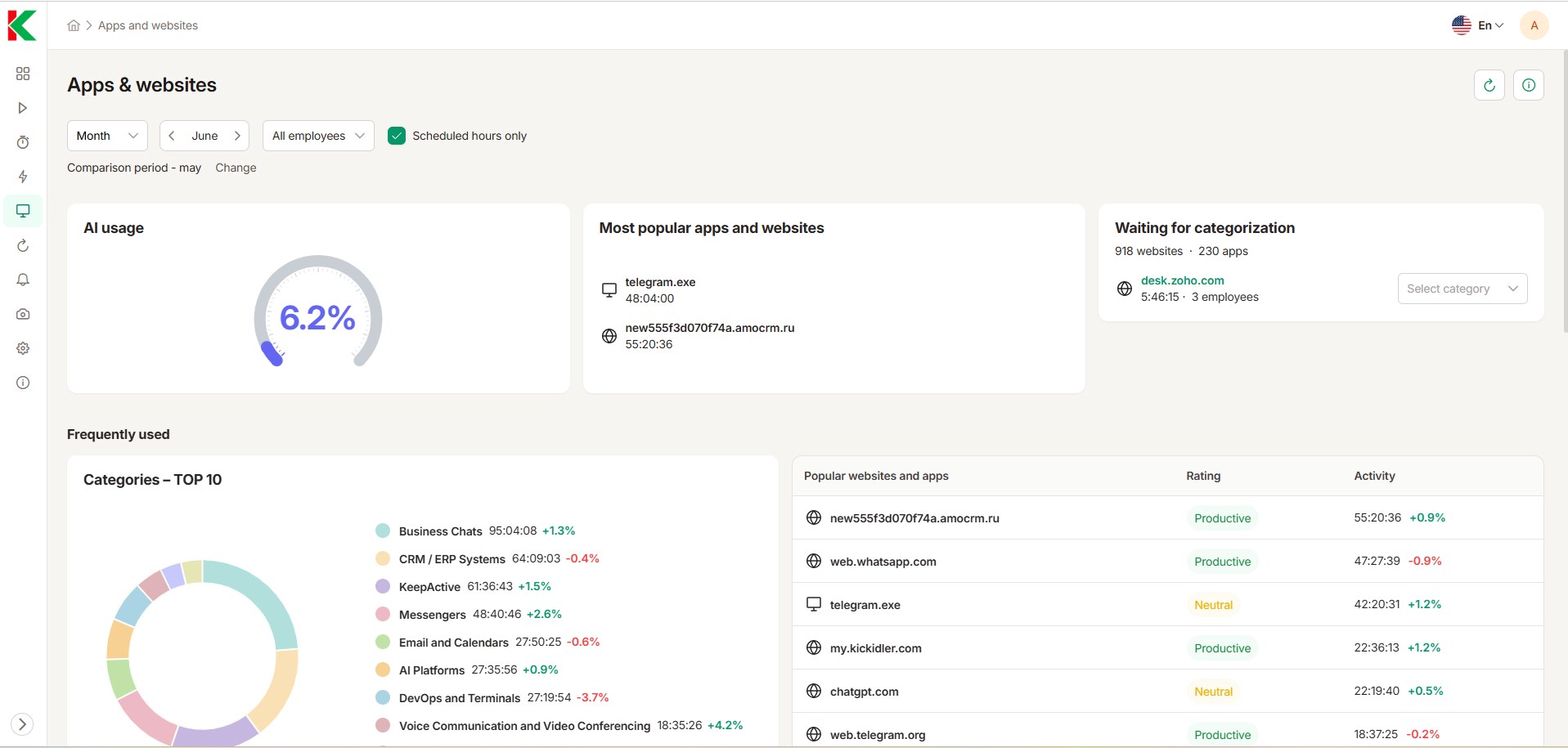
KeepActive can now identify employee use of AI tools on monitored company computers. Its application and website data, together with the AI Activity Summary, helps managers see which employees and teams use AI services and where that activity appears in the workday. This replaces guesswork and self-reported adoption with an operational baseline.
The signal should start a management conversation, not end one. KeepActive can show that an AI service was used; the manager still needs the work output, role context, approved-tool list, and employee explanation before deciding whether the pattern represents useful adoption, a training need, or a policy concern.
Use policy before enforcement
Employees should know which company devices are monitored, which categories of data are collected, the business purpose, who can access individual records, and how long the data is retained. The company’s ethical employee monitoring policy should cover AI-use detection before the feature is used for an investigation or performance conversation.
A good AI policy also names approved tools, forbidden data, human-review requirements, ownership of AI-assisted work, and the process for requesting a new service. Monitoring is easier to defend when employees have a practical route to do the right thing. The NIST AI RMF provides a useful structure for governing, mapping, measuring, and managing AI risk.
Regulators generally expect workplace monitoring to be necessary, transparent, and proportionate. The UK Information Commissioner’s worker-monitoring guidance is a useful benchmark even for companies that must adapt the details to another jurisdiction. Have counsel review the policy wherever employees work.
How to respond to the signal
If an approved AI tool is used heavily and output improves without more errors, capture the workflow and teach it to the rest of the team. If a paid tool has almost no meaningful use, investigate training and fit before renewing the licenses. If an unapproved tool appears occasionally, ask why the sanctioned option did not meet the need before blocking it.
Escalate when the evidence suggests a real security or compliance risk: sensitive files moving to an external service, repeated attempts to bypass controls, or AI being used for decisions that require documented human review. Even then, preserve the record, verify the device and account, hear the employee’s explanation, and follow the same incident process used for other tools.
Mistakes that make AI monitoring useless
- Treating visits to an AI website as proof of productive work.
- Setting an adoption quota before defining useful workflows.
- Combining security evidence with routine performance access.
- Ignoring approved use through APIs, mobile devices, or embedded assistants.
- Monitoring secretly when notice and a narrower control were practical.
- Punishing employees for using tools that managers informally encouraged.
Separate discovery from control
Discovery asks which AI services and embedded features are in use. Control asks what data may enter them and which decisions may rely on their output. Endpoint or web visibility can answer the first question, but it cannot see every model inside an approved CRM, code editor, meeting bot, or browser extension. Procurement, identity, expense, and integration records have to complete the inventory.
Use approved gateways or enterprise accounts for workflows that handle sensitive data, then apply review gates according to consequence. Drafting an internal summary needs a lighter control than screening applicants, changing prices, or sending regulated advice. Monitoring tells the company where to look; policy and workflow design decide what is allowed.
Measure decisions, not enthusiasm
AI monitoring is worthwhile only when it answers three concrete questions: where an approved tool saves time, where employees have moved outside policy, and whether the finished work has improved. A league table of AI users answers none of them.
