
In this article, you’ll discover top 10 workforce analytics software for 2026 to improve HR decision-making, explore its benefits, key features, pricing, and compare leading tools to find the right analytics platform for your organization.
Today’s data-driven world makes managing a team a challenge all on its own, and all the employee data that comes with it can easily make it downright overwhelming. Yet this data holds untapped potential – from every employee daily activity to performance review, such valuable insights could revolutionize how you attract, develop, and retain talent in your organization.
Numerous data points and metrics can be used to describe your workforce and track employee performance, but gathering all of the data in one place and seeing it in an easy-to-understand format can be rather tricky.
That’s where workforce analytics software comes in handy, helping you transform raw employee data into actionable insights that drive strategic business outcomes. The best workforce analytics software analyze patterns in employee behavior, performance metrics, and organizational dynamics, helping you better understand your team and make strategic decisions that’ll directly impact your bottom line.
To save you a significant amount of time, we’ve taken it upon ourselves to research and analyze the best workforce analytics software. In today’s article, we’ll cover the benefits of workforce analytics and offer you a carefully curated list of the top 10 tools currently available on the market, helping you choose the right one for your organization.
What Is Workforce Analytics Software?
Workforce analytics software is a tool that helps organizations collect, analyze and interpret employee data in order to drive strategic workforce planning and enhance organizational effectiveness. These tools include features like predictive analytics, real-time data visualization, and employee engagement monitoring that help HR specialists, managers, and business leaders gain insights into workforce trends, ensure data-driven decisions, and optimize team performance.
Workforce analytics solutions enable organizations to understand what’s happening within their workforce and even more – they offer potential reasons why it’s happening and effective response measures. This deeper level of understanding workforce dynamics supports strategic decision-making around team structure, investment, and growth.
Additionally, many analytics platforms offer integrated data from multiple sources, such as HR solutions, payroll tools, performance management software, recruitment platforms, and time and attendance software. Even more, most platforms present this accumulated data in a visually powerful way through charts and graphs to make it easier for managers to identify employee trends and patterns.
What Are Key Features of Workforce Analytics Software?
The following key features can be identified among the ones to keep an eye out for when selecting workforce analytics software:
- Real-time data visualization. Insights into workforce metrics allow teams to act quickly on relevant data
- Predictive analytics. Being aware of future needs supports strategic planning and workforce trends forecasting
- Time tracking. Understanding the way employees use their working hours helps manage team performance more effectively
- Productivity monitoring. Analyzing productivity trends, employee sentiment, and engagement metrics helps improve workplace culture and retention rates
- Customizable dashboards. Tailored dashboards help managers focus on specific data points that matter most to the organization
- Data privacy controls. Security features ensure workforce data is secure and complies with data protection regulations
- Integration capabilities. Having a wide range of integrations facilitates seamless data flow between the software and other existing systems to ensure efficient data management
- Scalability. The software needs to be able to grow along with the needs of the organization, handling an increasing volume of data and users in an efficient manner
- AI-driven insights. AI-offered recommendations based on data analysis help enhance decision-making processes
What Are Business Benefits of Workforce Analytics Tools?
Implementing workforce analytics software offers numerous benefits for your team and business, some of which include the following:
- Better workforce planning and strategic decision-making. Predictive workforce analytics and real-time data monitoring tools help managers make well-informed decisions that align with organization’s main business goals
- Enhanced employee engagement. Tracking engagement metrics helps understand employee sentiment and improve workplace culture
- Increased employee productivity. Dashboards and benchmarking provide clarity on team capabilities so that you can assign the right people to the right projects. Insights into time tracking and employee performance help identify productivity trends and optimize team performance
- Improved employee retention. Workforce analytics can help identify the factors contributing to high employee turnover and the remedial measures that can be taken to avoid it in the future
- Strengthened employee trust. Workforce analytics help you access data on what’s happening within the organization and how your employees perceive it. It’s crucial to listen to employee feedback, seeing how it will help you build and maintain employee trust, a critical element of high employee engagement, retention percentages, and overall success
- Cost efficiency. Analyzing workforce data helps executives identify areas to cut costs and allocate resources wisely. Additional non-obvious benefit includes better hiring accuracy and role alignment, which can help reduce attrition and avoid the costs associated with rehiring
How to Choose the Right Workforce Analytics Platform?
We realize that it’s rather easy to get overwhelmed by extensive descriptions and complex pricing structures, so here are a few key factors for you to keep in mind and stay focused during your unique software selection process:
- Data visualization. Graphical representation of employee data through dashboards, charts, and graphs facilitates easy interpretation and understanding of complex data sets.
- Data integration. Seamless data flow between digital platforms saves time and reduces errors. It’s important to gather and integrate data from various sources such as HR solutions, time and attendance software, performance management tools, and external databases.
- Analytics and reporting. Advanced analytics capabilities offer the insights you need to drive strategic initiatives and improve workforce outcomes. Identifying trends and patterns within workforce data over time helps understand historical performance and anticipate future developments.
- Ease of use. User-friendly interface and intuitively designed navigation features will facilitate ease of use and help your team with varying levels of technical expertise adapt to the software implementation in an efficient manner.
- Scalability. Ability of the software to grow with the team to accommodate the evolving needs of the organization and handle increasing volumes of data and users without compromising performance.
- Customizability. Tailored reports and personalized dashboards help you focus on what matters most based on the specific needs and preferences of your organization
- Security and compliance. Strong data protection measures, such as encryption, access controls, need to be enforced in order to ensure the confidentiality, integrity, and privacy of sensitive workforce data, as well as compliance with data privacy regulations, such as GDPR and CCPA.
- Customer support. Responsive customer support offered by the software developers can be critical in case you encounter issues or need assistance.
- Pricing. The total cost of ownership, including subscription fees, setup costs, and potential add-ons needs to be taken into account to make sure it aligns with the budget and other financial constraints of the organization.
Evaluating Best Workforce Analytics Tools: Comparison and Reviews
1. KeepActive (prev. Kickidler) – best for comprehensive workforce analytics
KeepActive (prev. Kickidler) is a workforce analytics solution that enables organizations to identify, track, and measure workforce abilities. The software supports data-driven workforce planning by converting workforce data into actionable insights through real-time insights into workforce capabilities, training effectiveness, and skill progression via customizable dashboards.
KeepActive (prev. Kickidler) provides businesses with real-time, data-driven insights into employee productivity, task performance, and overall workforce efficiency. It aims to strike a balance between tracking productivity and respecting employee privacy, fostering a culture of trust and transparency in the workplace.
Key features:
- Time and attendance monitoring
- Employee productivity tracking
- Workflow optimization insights
- Task and project tracking
- Automated reporting and data insights
- Self-monitoring Autokick interface
Pros:
- Privacy-conscious approach to employee monitoring
- Relatively easy implementation
- KeepActive (prev. Kickidler) 2.0 improved functionality will offer strong AI-ready data analytics and provide even more efficient real-time monitoring.
Cons:
- Mobile app in development
- May raise employee privacy concerns
2. ActivTrak – best for employee behavior tracking
ActivTrak is a workforce analytics platform for businesses that monitor employee productivity and activity. It provides detailed insights into employee activities to help teams understand work patterns and optimize performance.
The software’s real-time monitoring functionality helps managers see what projects are using the most resources. The tool’s productivity reports help identify workforce trends and areas for improvement.
Key features:
- Detailed productivity monitoring and reports
- Productivity trend identification
- Customizable alerts
- A wide variety of integrations
Pros:
- Detailed insights into work patterns
- Real-time activity monitoring
Cons:
- Some features require technical setup
- Limited to digital work activities only
- Can be considered intrusive by employees
3. Teramind – best for hybrid workforce monitoring
Teramind is a workforce analytics platform designed to help organizations monitor employee activity, optimize productivity, and enhance compliance.
The software combines behavior analytics, process optimization, and insider risk management to provide managers with a complete real-time view of employee performance and data security.
Key features:
- Insider risk management functionality
- Real-time activity tracking
- Behavior analyticsand business process optimization
Pros:
- Strong insider risk protection features
- Deep behavioral analytics tools
- Specialized focus on productivity analytics
Cons:
- Narrow focus compared to comprehensive HR analytics
- Occasional software performance issues
4. Hubstaff – best for efficient advanced data collection
Hubstaff is a workforce analytics tool that offers advanced data collection and productivity monitoring to optimize HR management.
The software also includes tools to help you best utilize data in a unified location, including its data analysis capabilities and data preparation tools.
Key features:
- Comprehensive scheduling tool
- Customizable project monitoring
- Customizable daily and weekly limits
Pros:
- High user satisfaction ratings
- Real-time data insights
Cons:
- Complex initial implementation
5. Deel – best for strategic workforce management
Deel is an innovative workforce analytics platform that provides comprehensive payroll, HR, and compliance solutions for businesses to manage their international workforce with ease.
The software offers robust tools for cost management and scenario planning, enabling informed, forward-looking employee-centric decisions. It focuses on strategic workforce management through its real-time insights and customizable reports, allowing teams to adapt quickly to change and stay aligned with business goals.
Key features:
- Real-time employee feedback
- AI-powered insights into employee performance
Pros:
- Robust tool for facilitating remote work
- Comprehensive features for HR, IT, and payroll management
- Global compliance with local labor laws
Cons:
- Limited customization options
- Rather complex to set up for small teams
6. Tableau – best for workforce analytics data visualization
Tableau is a data visualization and workforce analytics platform that allows users to import raw data and have it transformed into easy-to-understand visuals that are great for decision-making.
The software helps users create interactive visualizations of data using charts, graphs, maps, and dashboards to compile comprehensive datasets for analysis.
Key features:
- Ready-built templates
- Interactive data visualization
Pros:
- Real-time data visualization
- Native integrations with a variety of software
Cons:
- Could be considered complex by less tech-savvy employees
7. Workday – best for advanced HCM analytics
Workday is a cloud-based human capital management (HCM) platform that doubles as a workforce analytics tool, helping organizations manage workforce operations and providing businesses with data-driven insights to optimize workforce planning.
With its analytics tailored specifically for HCM, Workday can provide your team with real-time insights into workforce trends, forecast staffing needs, and even identify potential risks, helping managers make better-informed decisions.
Key features:
- AI-powered anomaly detection
- Automated compliance tracking
- Interactive drill-down reporting
Pros:
- Comprehensive HCM analytics
- Supports strategic decision-making
Cons:
- Lack of transparency in pricing details.
Workday is a cloud-based platform that provides a unified solution for managing human resources, payroll, talent, and workforce planning. It provides workforce analytics and transactions in the same secure system you use to capture your people data. You can see what’s happening and act immediately. Here’s some of its key features:
- Use Workday Prism Analytics to combine and analyze data from all sources, including Workday, for comprehensive insights into your workforce's skills, well-being, and location.
- Our augmented analytics application quickly identifies trends and uncovers key metrics and their drivers, helping you stay ahead of the curve.
- Compare your performance with peers to identify strengths and areas for improvement using Workday Benchmarking.
8. Visier – best for real-time HR insights
Visier is a workforce analytics software that provides real-time insights into workforce data to enhance operational efficiency, planning, and decision-making.
The software offers real-time dashboards, allowing business leaders and HR specialists to see data as it happens. What’s more, its pre-built metrics and digital assistant Vee can save managers significant amounts of time by simplifying routine analytics tasks and offering ready-to-use analytics.
Key features:
- Comprehensive data sets and models
- Digital assistant Vee that enhances user experience by offering self-service analytics according to specific needs
Pros:
- Automation tools for routine tasks
- Talent management functionality
- Quick insights without extensive setup using pre-built metrics
Cons:
- No mobile app available
- Limited customization flexibility
9. we360.ai – best for improving employee-HR relationship
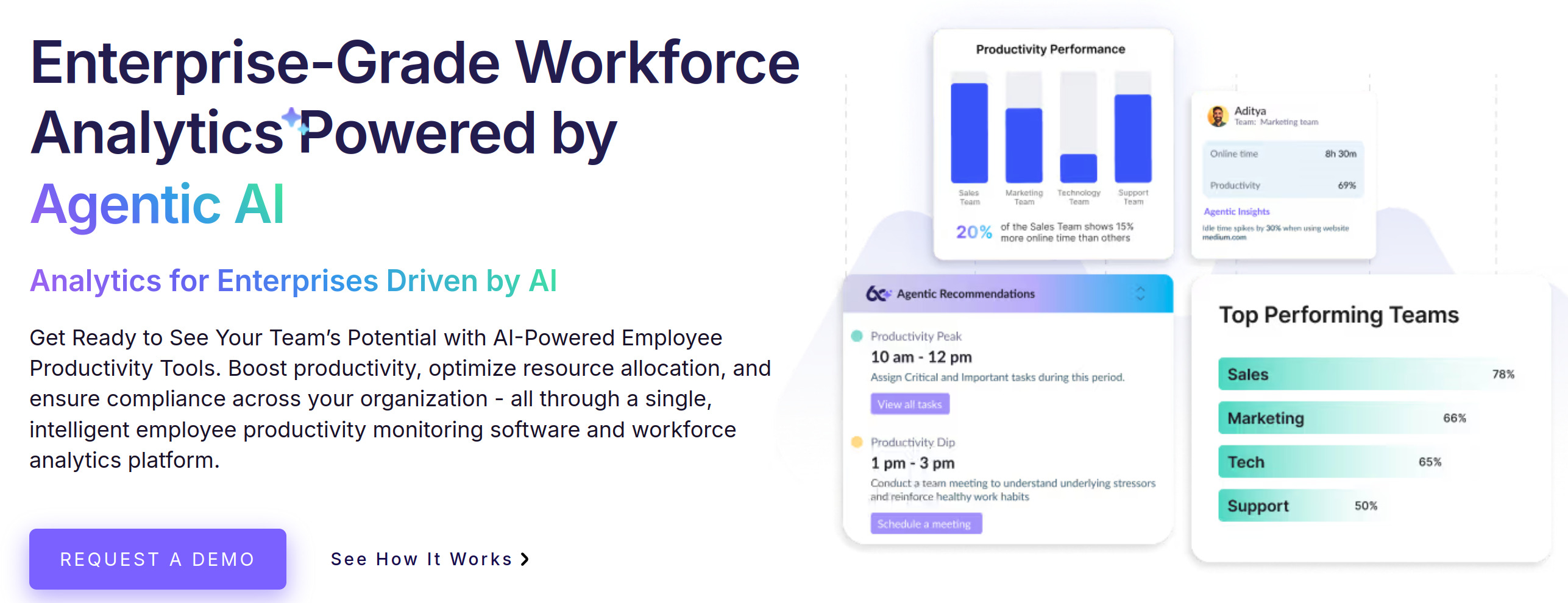
we360.ai is a user-friendly workforce analytics solution that helps managers stay updated on all employee activity and tasks from any device.
The solution helps monitor employee engagement by analyzing work patterns, including key presses and mouse movements. It offers over 100 comprehensive reports to track workforce performance that cover everything from employee attendance and activity to team productivity.
Key features:
- Work-related productivity labels
- Mouse movement and keystroke tracking
- Attendance tracking
- Goal setting and benchmarking
Pros:
- Extensive task and project management features
- Goal setting and tracking tools
- Affordable pricing
Cons:
- No continuous video screen recording
10. Oracle Analytics– best for employee performance analytics
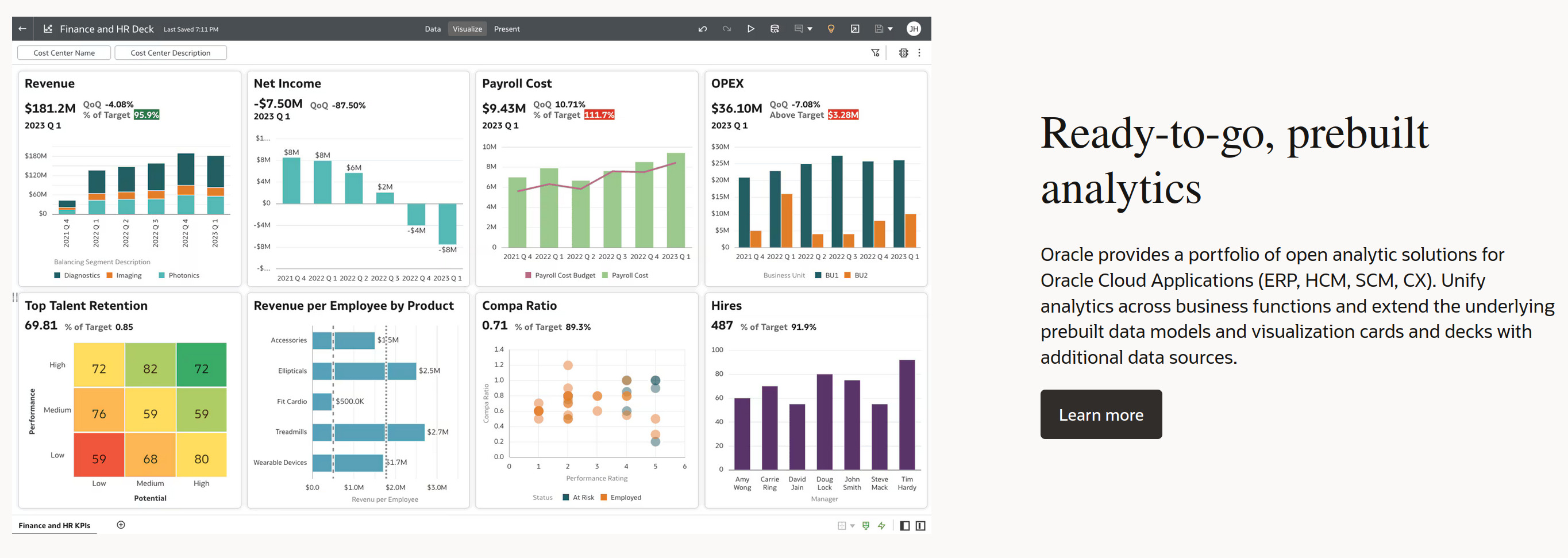
Oracle Analytics is a comprehensive workforce analytics platform that can be used for data analysis, visualization, and insights.
AI and machine learning are embedded throughout the platform so as to accelerate productivity and empower better business decision-making.
Key features:
- Workforce management
- Mobile app with a unique podcast feature that overviews detailed trends, changes, and highlights of employee data
- Data visualization and storytelling
Pros:
- Data-level security
- Open data source connectivity
- Built-in ML
Cons:
- Can be rather pricey for small businesses
What is Workforce Analytics Software Pricing?
When you select workforce analytics software, you need to have an understanding of the different pricing models and plans available. Generally speaking, your costs will vary based on required features, team size, add-ons, and more.
Here’s a quick summary of the most common workforce analytics software solutions plans, their average prices, and typical features:
- Personal pricing plans ($15 – $50 per user/month) commonly offer basic reporting and analytics, limited data storage and integration capabilities, as well as minimal tech support.
- Business pricing plans ($50 – $100 per user/month) offer more advanced analytics with strong data visualization functionality, customizable dashboards, increased data storage, and full feature access.
- Additionally, some solutions also offer free versions with limited functionality as well as a free trial period, usually a 7-day or a 14-day one.
Why Trust Our Workforce Analytics Reviews?
Innovative workforce analytics solutions are about more than analyzing employee data – they help transform insights into actions and utilize human capital more effectively.
The analytics tool can make or break company efforts in planning workforce objectives, so you as a business leader need to be incredibly thorough during the choosing process.
A few additional tips we’d recommend include the following:
- Define objectives and challenges of your organization;
- Research reputable vendors with positive customer reviews;
- Determine required features of the software, like data integration, visualization, and predictive analytics;
- Ensure compatibility with existing solutions and data sources;
- Choose intuitive interfaces and customizable dashboards;
- Verify compliance with data security standards;
- Evaluate pricing plans and potential benefits;
- Seek recommendations and references from industry peers.
What Are the Latest Workforce Analytics Trends?
Workforce analytics software is rapidly transforming from a simple monitoring tool into a strategic business driver, with many industries utilizing modern employee analytics solutions. With human capital becoming the biggest competitive advantage, these platforms are indispensable when it comes to shaping the future of work.
Here are some of the trends we predict will get big in the upcoming years:
- Enhanced real-time analytics. Previously, organizations have relied heavily on old analytics that were gathered on a yearly or a half-yearly basis. This trend is now changing, since it’s becoming crucial for organizations to gain access to information as things happen. Monitoring solutions are therefore looking to provide managers with real-time data access so that they can take action at the right time.
- Importance of transparency. Federal regulations, with one of the most prominent being the GDPR, are fueling many positive developments in workforce data collection. But while it clears the air regarding what kind of data needs to be collected and how to use it judiciously, at the same time, this regulation has created some uncertainty about the acceptable kind of data processing. Heavy fines imposed on companies that are unable to follow the GDPR protocols place certain restraints on the organizations’ ability to take the next step forward in terms of workforce analytics.
- Focus on employee productivity. Most problems in organizations generally can be solved by recruiting new people. However, this tends to lead to several issues, which include losing well-experienced employees and having to provide new employees with the time needed to adjust to the organization’s culture and working processes. As new people come to speed, productivity will inevitably hamper. Using employee data, you can identify characteristics of top-performing employees and conditions that facilitate excellent performance to improve overall productivity. Even more, workforce analytics platforms have evolved beyond simple productivity tracking and are now helping businesses to predict turnover risks, optimize workforce strategies, and ensure compliance with labor regulations.
- Employee-centric workforce analytics. Lack of trust has an immensely negative effect on workforce analytics. To combat it, you need to make monitoring more employee-centric. After all, employees are your main asset; treat them as such. Workforce analytics dashboards should reflect meaningful data that can aid in making wise workforce-related decisions, with the focus being on how employees benefit from said collected data.
- Change of approach. Most traditional organizations believe a top-down approach to be the correct and most common one. To change performance management process throughout the organization is a proper challenge for both managers and HR specialists alike. However, whether you admit it or not, employees are now playing a more active role and taking the time to openly voice their feedback, whether about organizational culture, managers, or overall workplace environment. It’s therefore up to you as a business leader to gather appropriate data through this analogue of a grassroots initiative and make use of workforce analytics.
- Hyper-personalized predictive intelligence. AI and ML are expected to go beyond identifying performance trends, with employee analytics solutions moving towards proactive offering of actions that can be taken to retain top talent and optimize team performance. Advanced behavioral data-based analytics will help organizations measure employee engagement in real time, even across hybrid and remote teams.
Choosing the Best Workforce Analytics Software for Your Business
In the age of everyday rapid changes and overwhelming uncertainty, organizations that embrace data-driven workforce analytics approach are thriving, with better team morale, improved employee productivity, and consistent work quality across all teams.
Among the leading workforce analytics software, Kickidler stands out with its powerful AI-ready analytics functionality and predictive insights that help organizations enhance employee engagement, optimize company investments, and build a future-ready workforce.
Integrating advanced workforce analytics platforms into strategic management is helping reshape the foundation of modern organizations, since it enables reaching previously unattainable foresight.
It’s wise to keep in mind that the analytics functionality of the software has transcended its monitoring role and has truly become a crucial part of efficiently navigating workforce dynamics.
FAQ (Frequently Asked Questions): Find Answers and Solutions:
What is workforce analytics software?
Workforce analytics software is a tool that helps businesses analyze employee working hours, their activity and productivity, as well as work patterns, and optimize resource allocation using real-time data and aggregated reports.
How does workforce analytics software improve productivity?
Workforce analytics software monitors employee activities, tracks time employees spend on decisions, and provides insights into workflows, helping managers make data-driven improvements.
Can workforce analytics software be beneficial for remote teams?
Workforce analytics software is especially useful for remote and hybrid teams, since it provides real-time employee tracking and attendance monitoring, enabling better work performance transparency.
How can businesses benefit from workforce analytics software?
Organizations that utilize workforce analytics software gain better decision-making capabilities, improve their employee efficiency, optimize resource management, and enhance employee engagement.
Workforce analytics software provide insights into employee performance and overall workforce trends, which helps businesses identify existing bottlenecks and areas for improvement, optimize training and development, make smarter hiring decisions, and boost employee productivity.
