
Time blocking sounds almost too simple.
You take your calendar. You divide the day into blocks. You decide when to do deep work, meetings, admin, communication, reviews, planning, and breaks. Then you try to follow the plan instead of letting the day explode into random messages and “quick calls.”
That is the idea.
And honestly, it works. At least when people use it like adults.
The problem starts when companies turn time blocking into another control mechanism. Suddenly every 30-minute block must be justified. Every calendar gap becomes suspicious. Managers start treating the schedule like a surveillance tool. Employees stop planning honestly and start building calendars that look good instead of calendars that help them work.
That is not time blocking. That is micromanagement wearing productivity clothes.
Used well, time blocking helps teams protect focus, reduce chaos, plan workload, and make work more visible. Used badly, it makes people feel like they need permission to think.
This guide is for managers, team leads, HR teams, founders, and operations people who want to use time blocking without killing trust.
Quick answer
Time blocking is a time management method where employees schedule specific blocks of time for specific types of work: deep work, meetings, admin tasks, communication, planning, learning, breaks, or project work.
For teams, time blocking works best when it is used as a planning and focus tool — not as a minute-by-minute control system.
The goal is not to fill every calendar slot perfectly. The goal is to make priorities visible, protect focused work, reduce context switching, and help managers understand workload without constantly asking, “What are you working on right now?”
For remote and hybrid teams, time blocking becomes even more useful when paired with a transparent employee time tracking system, because managers can compare planned work time with actual work rhythm without turning every day into a status meeting.
What is time blocking?
Time blocking is a simple way to bring structure to a chaotic workday: instead of letting meetings, messages, and “quick questions” take over, teams reserve specific calendar blocks for deep work, communication, planning, admin tasks, and breaks. Unlike timeboxing, which limits how much time can be spent on a specific task, time blocking focuses on when different types of work should happen during the day.
Time blocking is a simple productivity method: instead of keeping a loose to-do list, you assign tasks or types of work to specific blocks in your calendar.
For example:
Nothing magical. Just a structure.
The real value is that time blocking forces a person to answer three uncomfortable questions:
- What actually matters today?
- When will I do it?
- What should not steal that time?
That is why time blocking can be powerful. It turns vague intention into a visible plan.
Why time blocking works for teams
Individual time blocking is useful. Team time blocking is where things get interesting.
A team is not just a collection of people with calendars. It is a system of dependencies. One person’s “quick question” can break another person’s two-hour focus block. One poorly timed meeting can destroy half a day of deep work. One overloaded employee can look “busy” for weeks before anyone notices the problem.
Time blocking helps teams make work patterns visible.
It helps answer:
- When do people need focus time?
- When should meetings happen?
- Where are the overloaded days?
- Are priorities realistic?
- Do employees have enough uninterrupted time?
- Are managers constantly breaking deep work?
- Is communication spread across the whole day?
- Are people working late because the day is badly structured?
That last one matters. Many teams do not have a motivation problem. They have a calendar problem. People spend the day in meetings and messages, then do actual work at night. Then managers wonder why everyone looks tired.
Time blocking does not fix bad management by itself. But it makes bad management harder to hide.
Time blocking vs time tracking
These two ideas are related, but they are not the same.
Time blocking is the plan. Time tracking is the reality check.
The plan matters because it creates intention. The reality check matters because plans are often optimistic.
A manager might think the team has plenty of time for focused work. Then the data shows that deep work keeps getting broken by meetings, messages, context switching, and unplanned requests. That is where tools like employee monitoring software can help — not to punish people for imperfect calendars, but to understand how work actually flows.
The wrong way to use time blocking
Let’s get this out of the way.
The worst version of time blocking looks like this:
- every employee must fill the calendar from 9 to 6;
- every block must be approved by a manager;
- managers check whether people follow blocks minute by minute;
- employees are criticized for every deviation;
- “empty space” is treated as laziness;
- unexpected work is seen as poor planning;
- people create fake calendar blocks to look productive.
This is how a useful method becomes corporate theater.
The calendar starts looking impressive. The work does not improve.
People spend more time managing the appearance of productivity than doing the work itself. And once employees realize the calendar is being used against them, they stop using it honestly.
That is the core rule:
If you want honest time blocking, do not punish people for honest calendars.
The right way to use time blocking
Healthy time blocking is not about controlling every minute. It is about creating a shared rhythm.
A good team time blocking system helps people:
- protect deep work;
- reduce unnecessary meetings;
- batch communication;
- make workload visible;
- plan around energy levels;
- avoid constant context switching;
- set realistic deadlines;
- create space for thinking;
- notice overload earlier.
The manager’s role is not to inspect every block. The manager’s role is to protect the team’s ability to do meaningful work.
That may mean:
- fewer meetings;
- meeting-free mornings;
- shared focus blocks;
- clearer priorities;
- better sprint planning;
- less “urgent” noise;
- more async communication;
- regular review of workload.
Time blocking works best when it gives employees more control over their workday, not less.
Common time blocking methods
There is no single perfect format. Different teams need different systems.
1. Classic time blocking
This is the basic version: schedule specific tasks into calendar blocks.
Example:
- 9:00–10:00 — email and planning;
- 10:00–12:00 — product research;
- 13:00–14:00 — meetings;
- 14:00–16:00 — writing;
- 16:00–17:00 — review and admin.
Best for employees who need structure and clear priorities.
2. Task batching
Task batching means grouping similar tasks together.
Instead of answering messages every five minutes, a person checks them at 10:30, 13:00, and 16:30. Instead of reviewing reports randomly, a manager blocks one hour for reviews.
This reduces context switching. And context switching is one of the quiet killers of productive work.
3. Day theming
Day theming gives each day a primary focus.
For example:
- Monday — planning and team sync;
- Tuesday — deep project work;
- Wednesday — client calls;
- Thursday — execution;
- Friday — review and documentation.
This works well for managers, founders, consultants, and teams with recurring work cycles.
4. Focus blocks
Focus blocks are protected periods for deep work.
No meetings. No non-urgent messages. No “quick calls.” No random status checks.
For many teams, two good focus blocks per week already make a visible difference. For creative, technical, analytical, and strategic work, they can be the difference between progress and noise.
5. Buffer blocks
Buffer blocks are time reserved for the unexpected.
This sounds boring, but it is one of the smartest parts of time blocking. Most workdays do not go exactly as planned. Something breaks. A client replies. A teammate needs help. A meeting runs over. A task takes longer than expected.
Without buffers, time blocking becomes fantasy. With buffers, it becomes realistic.
A simple time blocking template for teams
Here is a practical template for a typical office, remote, or hybrid team.
This is not a universal schedule. It is a starting point.
Support teams, sales teams, developers, designers, accountants, HR teams, and managers will all need different rhythms. The point is not to copy a perfect template. The point is to create a workday that has structure instead of constant interruption.
How teams can use time blocking without micromanagement
This is the part that matters most.
Time blocking becomes dangerous when managers use it as proof of productivity. A calendar is not performance. A full calendar is not impact. A person can be busy all day and still produce very little value.
Use these rules to keep time blocking healthy.
1. Block types of work, not every tiny task
Do not force employees to schedule every micro-action.
Bad:
- 9:00–9:12 — answer John;
- 9:12–9:25 — update spreadsheet;
- 9:25–9:40 — check email;
- 9:40–9:55 — read doc.
This is madness.
Better:
- 9:00–9:30 — admin and messages;
- 9:30–11:30 — deep work;
- 13:00–14:00 — project review.
The calendar should create clarity, not become a second job.
2. Leave room for reality
A calendar with no buffer is a lie.
People need time for:
- switching between tasks;
- unexpected questions;
- urgent issues;
- breaks;
- thinking;
- fixing mistakes;
- helping teammates.
If every minute is blocked, the plan will fail by lunch. Then people will feel guilty for failing at an unrealistic system.
A good time blocking method includes white space.
3. Do not measure performance by calendar beauty
Some employees create beautiful plans and miss deadlines. Others have messy calendars and deliver excellent work.
Time blocking is a planning tool. It should support performance management, not replace it.
Good performance questions are:
- Did the work get done?
- Was the quality good?
- Were priorities clear?
- Was the workload realistic?
- Did the person communicate risks early?
- Did the team protect focus time?
Bad performance question:
- Did your calendar look perfectly blocked?
4. Let employees own their blocks
Managers can set team rules. Employees should still control their own calendars where possible.
For example, the team can agree:
- no meetings before 11:00;
- deep work on Tuesday and Thursday mornings;
- async updates before daily sync;
- admin work batched at the end of the day;
- no non-urgent messages during focus blocks.
But inside that structure, people should plan their own work. Autonomy is not a nice extra. It is one of the reasons time blocking works.
5. Use data to coach, not accuse
This is where many companies get it wrong.
A manager sees that productive activity dropped or idle time increased and immediately turns it into a confrontation.
Bad:
Your productivity is down. Explain.
Better:
I noticed your work rhythm changed over the last two weeks. There are fewer long focus blocks and more fragmented activity. Is it meetings, unclear priorities, workload, or something else?
Same data. Completely different conversation.
If you use time blocking with online monitoring, the point should be to reduce guesswork and help managers spot patterns earlier — not to turn dashboards into weapons.
How KeepActive 2.0 fits into time blocking
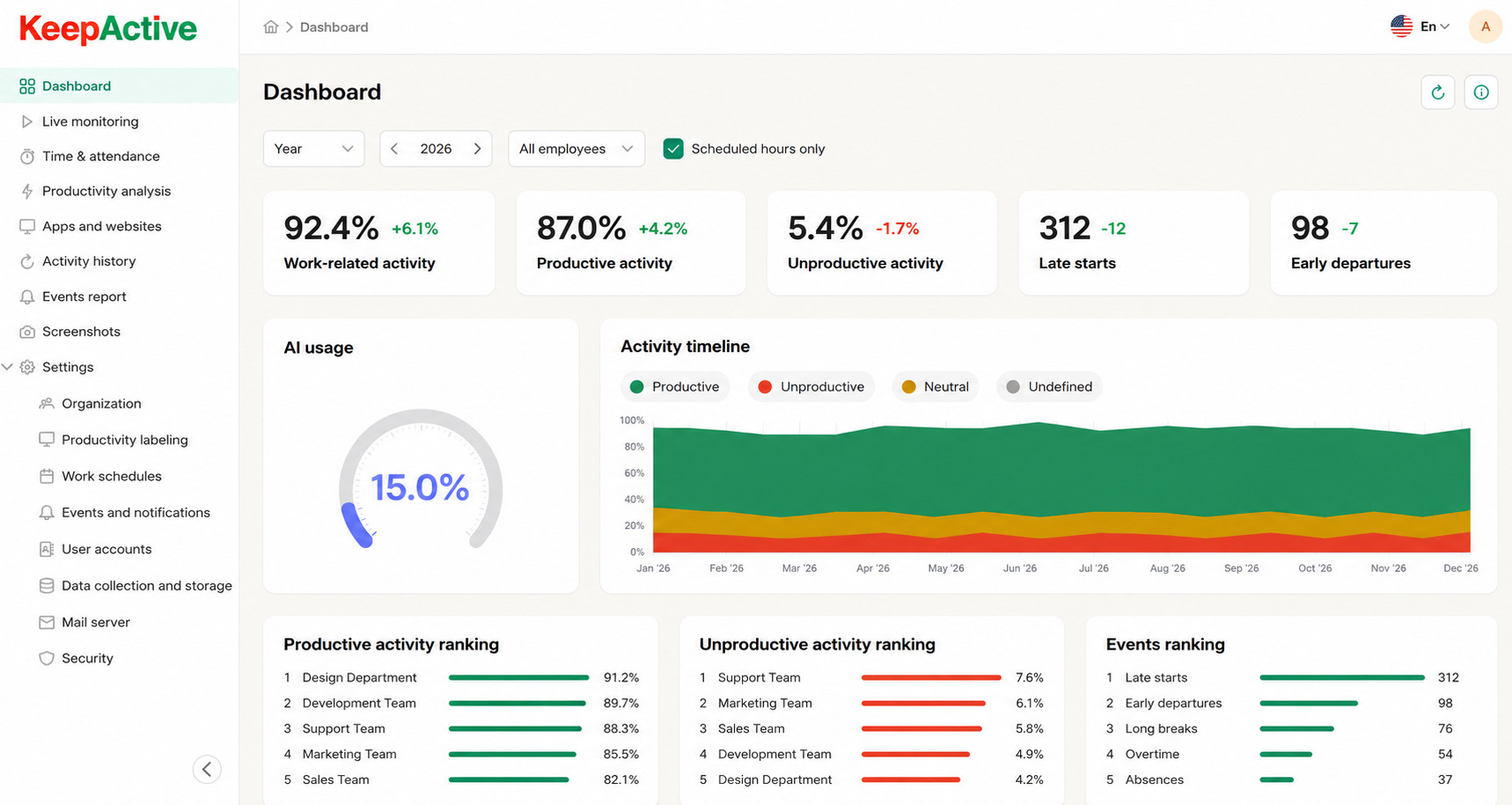
KeepActive 2.0 can be useful for teams that want to compare planned work with actual work patterns.
Time blocking shows what the team intended to do. KeepActive 2.0 helps managers understand what actually happened during the workday: when employees started, whether they were active, which parts of the day were productive, where idle time appeared, and whether the work rhythm matched the team’s schedule.
In KeepActive 2.0, teams can work with schedules, breaks, lateness, early departures, absences, time zones, activity data, screenshots, and role-based access. That makes it especially useful for remote, hybrid, and computer-based teams where managers cannot simply look around the office and understand what is happening.
Used well, KeepActive 2.0 does not replace time blocking. It makes time blocking more honest.
For example, a team might plan two daily focus blocks. After a few weeks, the manager can look at activity patterns and see:
- focus blocks are constantly interrupted by meetings;
- productive activity is strongest in the morning;
- afternoons are fragmented by messages;
- one department has too many early meetings;
- employees are working late because daytime is overloaded;
- late starts are increasing after heavy overtime weeks.
That is useful management information.
The wrong reaction is:
Why were you idle at 14:17?
The right reaction is:
Our planned focus blocks are not working. Let’s fix the schedule.
That is the difference between micromanagement and leadership.
Time blocking for remote teams
Remote teams benefit from time blocking because remote work can easily dissolve into a fog of messages, meetings, and unclear expectations.
Without structure, a remote employee may spend the whole day “available” but never get a real focus block. That feels productive in the moment, but at the end of the week the important work is still unfinished.
For remote teams, time blocking helps define:
- when people are available;
- when focus time should be protected;
- when meetings can happen;
- when async communication is preferred;
- how people signal deep work;
- when urgent interruptions are allowed;
- how workdays end.
The key is not to recreate the office online. Nobody needs a manager watching every minute.
The goal is to create a shared rhythm so people know when to collaborate and when to leave each other alone.
Time blocking for managers
Managers often need time blocking even more than individual contributors.
Why? Because a manager’s day is naturally fragmented. Messages, approvals, hiring, reporting, escalations, one-to-ones, planning, cross-functional meetings — everything competes for attention.
Without time blocking, managers become human routers. They forward information, answer questions, sit in meetings, and end the day wondering why the important thinking never happened.
A simple manager time blocking system might look like this:
| Block | Purpose |
| Morning planning | Priorities, risks, schedule check |
| Team support block | Questions, approvals, blockers |
| Deep work block | Strategy, hiring, process improvement |
| Meeting block | Calls grouped together |
| Review block | Feedback, reports, project updates |
| Shutdown block | Decisions, notes, tomorrow’s priorities |
A manager who protects their own focus time is usually better at protecting the team’s focus time too.
Signs your team needs time blocking
Time blocking may help if:
- people complain about too many meetings;
- important tasks are always pushed to the evening;
- employees feel busy but not productive;
- managers constantly ask for status updates;
- workdays are fragmented by messages;
- deadlines slip even though everyone looks overloaded;
- remote workers have unclear availability;
- meetings interrupt deep work;
- employees struggle to prioritize;
- burnout signals are increasing.
This does not mean time blocking will magically solve everything. But it gives the team a structure to start from.
If the deeper issue is poor workload planning, time blocking will reveal it. If the issue is too many meetings, time blocking will expose it. If the issue is unclear priorities, time blocking will make that painfully obvious.
That is a good thing.
Common time blocking mistakes
Mistake 1. Blocking the whole day too tightly
A perfect calendar usually fails in real life.
Leave buffers. People are not machines. Work has friction.
Mistake 2. Treating every interruption as failure
Some interruptions are part of the job. Support, management, operations, sales, and HR all involve unexpected work.
The goal is not zero interruptions. The goal is fewer pointless interruptions.
Mistake 3. Using time blocking as employee control
If employees feel that time blocking is just another way to catch them, they will game the system. Honest planning disappears.
Mistake 4. Ignoring energy levels
Not all hours are equal. Some people do their best analytical work in the morning. Others are sharper later in the day. A good system respects patterns where the business allows it.
Mistake 5. Keeping all the meetings
You cannot add focus blocks on top of a meeting-heavy culture and expect miracles. Something has to move.
A simple rollout plan
Start small.
Do not announce a giant productivity transformation. Do not force everyone into the same rigid template. Do not require calendar perfection from day one.
Try this:
- Pick one team.
- Define the main problem: meetings, focus, delays, overload, unclear availability.
- Agree on two or three time blocking rules.
- Protect at least two focus blocks per week.
- Batch recurring meetings.
- Add buffer time.
- Review what changed after two weeks.
- Adjust based on real feedback and activity patterns.
A good pilot rule might be:
No meetings before 11:00 on Tuesday and Thursday unless there is a real emergency.
That one change can do more than a 40-slide productivity training.
Final thoughts
Time blocking is not about making calendars look impressive. It is about making work possible.
For teams, the real value is not that every hour gets a label. The value is that people stop pretending they can do deep work, answer messages, sit in meetings, help teammates, and think strategically all at the same time.
They cannot. Nobody can.
Good time blocking creates space for focus. It makes priorities visible. It shows when the plan is unrealistic. It helps managers see whether the team needs fewer meetings, clearer goals, better workload planning, or more protected work time.
Bad time blocking turns into micromanagement. It creates fake calendars, nervous employees, and managers who confuse schedule control with leadership.
The difference is simple.
Use time blocking to help people work better. Not to make them prove they are busy.
