
Software usage tracking records when and how business applications are used. Depending on the system, it may capture application names, active time, websites, versions, licenses, device inventory, feature use, or user groups.
Companies use the data to manage software spend, improve workflows, plan support, investigate security events, and understand how digital work happens. The same dataset can be useful or intrusive depending on its purpose, detail, access, and retention.
Types of software usage tracking
License and asset tracking connects installations, assigned licenses, last use, and devices to renewal decisions. It is designed to reclaim unused seats and control inventory.
Application activity tracking records app names and active time by user or team. It is useful for workflow and productivity analysis, but only when active time is defined carefully.
Product analytics captures feature events, sessions, adoption, and funnels inside a software product. It helps the vendor improve the product and is not automatically employee monitoring.
Web and SaaS discovery uses domains, browser activity, identity data, or connected accounts to find shadow IT and manage cloud spend. Security monitoring focuses on executables, access events, and unusual use for investigation.
These categories overlap. Start with the business question and collect only the data needed to answer it.
How software usage tracking works
Endpoint agents
An agent installed on a company device can record running applications, active windows, and time. This provides detailed coverage but requires careful configuration.
Browser extensions or network data
These methods identify web applications and domains. They may miss desktop software or confuse a website being open with active use.
Identity and SaaS integrations
Single sign-on, admin APIs, and finance systems can show assigned accounts, logins, and spend. They are useful for license management but do not always show meaningful feature use.
Application telemetry
Software vendors collect product events to understand adoption and reliability. This is common in product analytics and is different from employee-level activity monitoring.
Business use cases
License optimization
Compare assigned licenses with recent use before renewal. Look for duplicate tools, inactive accounts, premium features that are not used, and former employees who still have access.
Last login is not the same as business value. Some specialist tools are used rarely but are essential when needed. Confirm with the owner before removing access.
Workflow improvement
Application switching can reveal duplicate entry, fragmented processes, and unnecessary handoffs. If a support agent moves among eight systems for one case, the opportunity may be integration or process redesign.
Training and adoption
Usage data can show whether a new tool has reached the intended teams. Pair adoption with outcomes and user feedback; frequent use does not prove that the tool is effective.
Security and shadow IT
Tracking can identify unapproved applications, outdated software, or unexpected cloud services. Security teams should distinguish policy enforcement from productivity evaluation and limit access accordingly.
Workforce analysis
Team-level patterns can help explain meeting load, focus time, and application dependency. Do not use raw application time as a universal performance score.
Metrics that are actually useful
- active users by team;
- assigned versus used licenses;
- last meaningful use;
- cost per active user;
- duplicate-function applications;
- application-switching frequency;
- adoption by role;
- time in core versus supporting tools;
- unsupported or outdated versions;
- shadow SaaS discovery and owner status.
Define “active” for each purpose. A five-second background process should not count the same as intentional work.
A responsible deployment checklist
State the purpose
License optimization needs different data from a security investigation or workflow study. Avoid collecting employee-level detail “just in case.”
Minimize the data
Collect the least detail needed. Domain-level web data may be enough where full page titles would expose unnecessary personal or confidential information.
Separate access
Procurement, IT, security, and managers do not need the same views. Use role-based access and keep investigation data away from routine performance decisions unless the policy permits it.
Set retention
Operational trend data may be aggregated; detailed event history should have a defined retention period.
Tell employees
Explain what is collected, why, who can see it, and how it affects decisions. Use the company’s ethical monitoring policy as the governing document.
Validate before acting
Background processes, shared devices, remote desktops, idle windows, and offline work can distort the record. Confirm the context.
How to turn usage data into a defensible decision
Start by defining the denominator. Ten active users means little if 200 people have licenses, but it may be healthy if only 12 employees perform the specialized work. Compare usage with the eligible population, not the entire company.
Define meaningful use for each application. A login may be enough for a benefits portal and meaningless for a design platform. For a collaboration product, meaningful use may be creating, editing, or commenting. For a finance system, it may be completing an approved transaction. Write the rule before reviewing the numbers.
Segment by role, location, and work type. A product used daily by support and monthly by finance should not receive one company-wide adoption score. Segmentation also prevents managers from labeling a legitimate specialist tool as a low-value outlier.
Then check the result with the business owner and a small sample of users. Ask what the tool replaces, what breaks if it disappears, whether another product covers the same need, and whether the data missed offline, mobile, remote-desktop, or automated use. This conversation often saves more money than a blunt inactivity rule.
Make the decision reversible where possible. Downgrade a small group, remove duplicate seats at renewal, or run a 30-day consolidation pilot before canceling a system that holds critical history. Record the expected saving and the operational risk so the company can judge the result honestly.
Reading application-switching patterns
Switching data becomes useful when it is attached to one unit of work. Count how many systems an employee must open to resolve a ticket, approve an invoice, onboard a customer, or close a sales opportunity. A high daily app count on its own says little; a single case that repeatedly moves among eight tools points to a specific workflow problem.
Look at sequences as well as totals. Moving from email to a CRM to a spreadsheet and back to email may reveal duplicate entry. Repeatedly opening a knowledge base after every customer response may suggest that guidance is hard to find. Long gaps between systems can indicate waiting, but they can also represent offline work or focused analysis.
Validate the pattern with the people doing the work. Ask which switch is required, which exists because two systems disagree, and which could be removed through integration, a better default, or a clearer decision rule. The goal is fewer unnecessary handoffs, not fewer applications at any cost.
A 30-day software rationalization process
During the first week, build the inventory. Combine procurement records, identity data, device inventory, and usage data. Assign an owner to each product and flag duplicate functions, inactive accounts, former employees, premium features with little use, and contracts approaching renewal.
During the second week, validate the apparent waste. Send each owner a short evidence pack and ask for business-critical exceptions. Interview a few frequent and infrequent users. Check whether usage occurs through mobile apps, shared service accounts, APIs, virtual desktops, or seasonal workflows that the primary dataset does not capture.
During the third week, make product-level decisions. Keep tools with clear value and ownership. Downgrade plans when teams use only basic features. Consolidate products only when migration cost, data retention, integrations, and user needs have been considered. Remove access that is genuinely unused, and define a recovery path for mistakes.
During the fourth week, implement and measure. Reclaim licenses, update onboarding and offboarding rules, publish the supported-tool list, and close unauthorized accounts through the normal security process. Track realized savings, support tickets, user complaints, process delays, and any unexpected repurchases. Estimated savings are not savings until the invoice changes.
Repeat the review before major renewals, not every week. Continuous surveillance creates noise; a dependable inventory, clear ownership, and a scheduled decision process create control.
What employees should be able to see
Employees should know which applications and websites are recorded, whether the system captures active time or only installation and login data, how classifications are set, who can see individual detail, and how long the records remain available. They should also have a way to correct obvious context errors, such as a client research site labeled unproductive or offline work missing from the record.
Transparency improves data quality. People who understand the purpose are more likely to report shared devices, remote-desktop use, background processes, and workflow exceptions that would otherwise distort the analysis. It also draws a clear line between license management, security investigation, and performance review — three purposes that should not silently share the same rules.
How KeepActive shows applications and websites
KeepActive productivity analysis records application and website use for company computers and can classify resources as productive, neutral, or unproductive by role. Those classifications should be reviewed because the same tool can be essential for one team and irrelevant for another. For teams evaluating employee monitoring software, the first question is whether the data answers a defined operational need without collecting more than necessary.
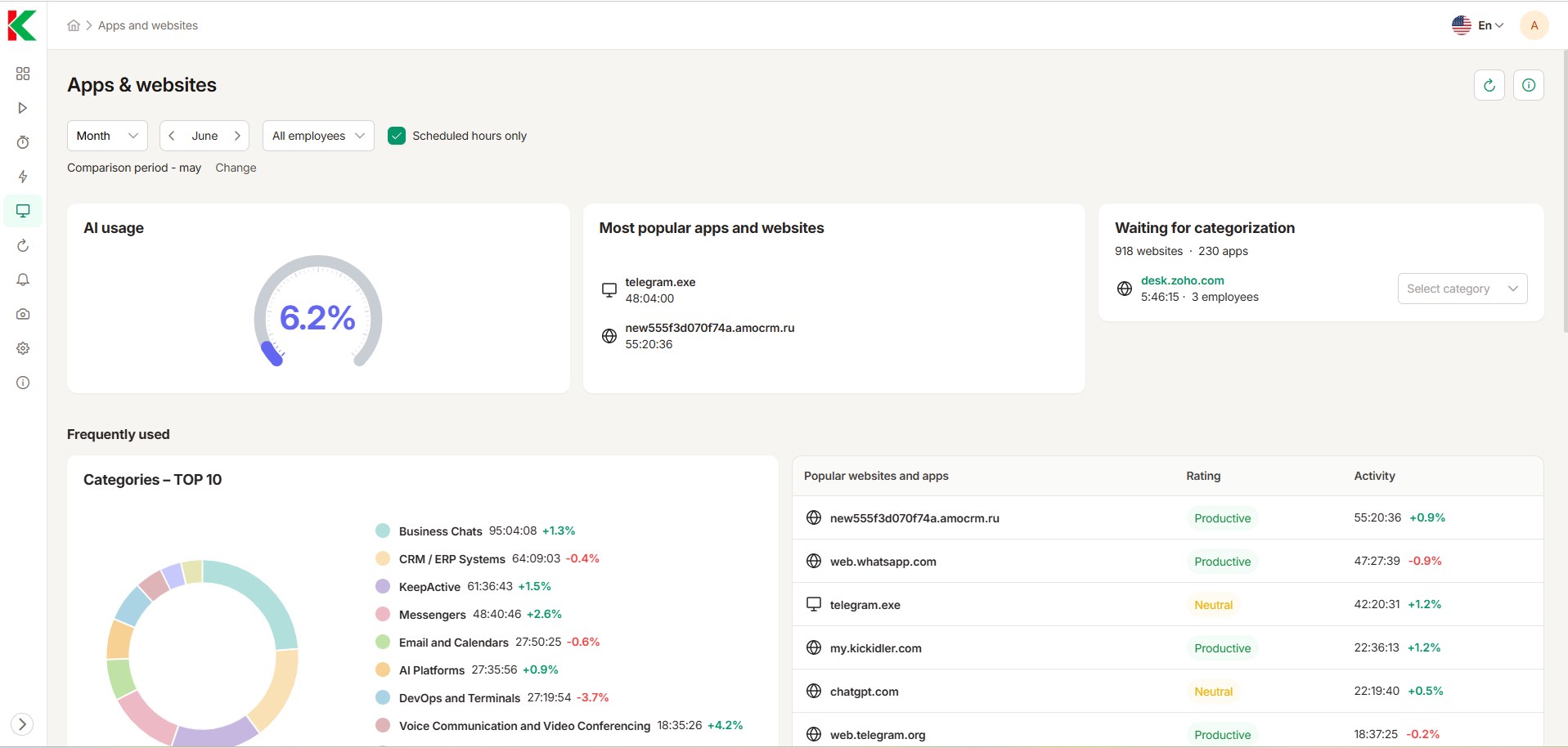
For browser-specific analysis, see website usage tracking.
A software rationalization record
Build one record for each application. Name the business owner, licensed users, genuinely active users, annual cost, core use, overlapping tools, and the proposed decision. Add an exception note for specialist software that is rarely used but critical when needed.
A decision should be explicit: keep, downgrade, consolidate, remove, or investigate. Record the evidence and the review date so the same debate does not restart at the next renewal.
Review the owner and business-critical exceptions before canceling. Record the decision so the same debate does not restart at the next renewal.
Software-usage mistakes that produce false conclusions
- Counting installation as adoption.
- Counting an open window as active work.
- Labeling every non-core app unproductive.
- Removing specialist software based on low frequency alone.
- Combining security and performance access without a policy.
- Keeping detailed history indefinitely.
- Comparing roles with different software needs.
- Claiming that application time caused an outcome.
Four decisions software-usage data should support
Renew, reduce, or reassign licenses
Compare assigned seats with active use, frequency, recency, and the business role of each user. A rarely opened specialist application may still be essential, while a broadly assigned collaboration tool may contain hundreds of inactive seats. Ask the application owner to confirm exceptions before removing access.
Retire overlapping tools
Usage data can reveal teams performing the same job in several applications. Before consolidating, identify integrations, external collaborators, regulated records, and workflows that depend on each tool. The best savings estimate includes migration, retraining, data export, and the risk of forcing specialized work into a weaker platform.
Fix a fragmented workflow
Repeated switching among a ticketing system, spreadsheet, chat, browser, and document editor may signal missing integration or unclear ownership. Trace one real case from intake to completion, then compare event timestamps with employee explanations. The goal is to remove duplicate entry and waiting, not to minimize every application change.
Investigate an access or security concern
Unexpected use of unsanctioned storage, remote-access tools, or generative AI may justify review. Treat the log as a lead, not a verdict. Confirm the device, account, approved exceptions, and whether the application name accurately represents what happened.
Application names are only the first layer of a security investigation. When the purpose is data-loss prevention, KeepActive DLP can record file operations and transfers, clipboard activity, printing, and connected USB devices, then block selected actions under policy. These signals are more useful for reconstructing a risky event than an app-duration total, but access should remain with authorized security staff and each control should be disclosed and limited to the stated purpose.
What the record does not tell you
An application log cannot establish intent, effort, quality, or business value. It may miss calls, meetings, paper work, thinking, travel, or remote-desktop activity. Shared devices can distort duration. Important decisions still need operational evidence and human context.
Questions to ask a vendor before deployment
Ask which events are collected, whether tracking stops off duty, how idle time is handled, and who can see individual records. Confirm retention, deletion, export, audit logs, employee access, and screenshot controls. Test the answers with a small group before relying on the data.
Track less, decide better
Before collecting another field, write down the decision it will support. If nobody owns that decision, or the same answer is available from a less intrusive source, leave the field out.
