
v11.3.3651 (build: May 13 2026)
Installation on local computer (Linux)
Installation package should be downloaded here.It is highly recommended to use standard Linux terminal for entire installation process!
Installation of .deb-package (Ubuntu, Debian, Linux Mint, Astra Linux):
1. Update packages lists:
sudo apt-get update
2. Setup our package:
sudo dpkg --install stkh-client_X.XX_amd64.deb
3. In case problem with dependencies additional must be downloaded:
sudo apt-get install -f
During the setup process standard window with "Server machine" field will appear:
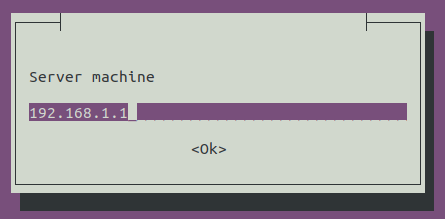
The options for filling this field and the rules for client update/uninstall are completely similar to the Windows-client.
Installation of .rpm-package (CentOS, RED OS, Rosa Linux, AltLinux, AlterOS):
1. Setup our package:
sudo yum localinstall stkh-client-X.XX-0.x86_64.rpm
For Rosa Linux:
urpmi stkh-client-X.XX-0.x86_64.rpm
2. Set the server connection option:
stkh-client --server=192.168.1.2